


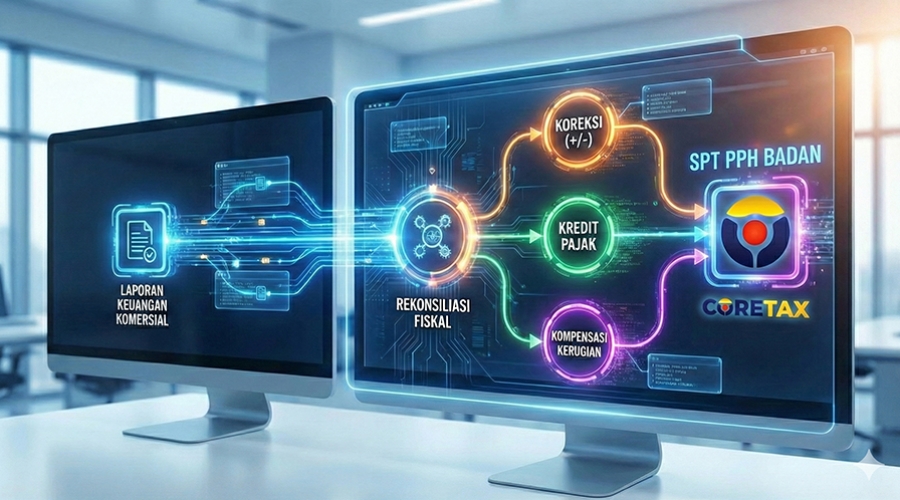
The Indonesian tax system is undergoing the biggest transformation in its history. Through the launch of the Core Tax Administration System (CTAS) or Sistem Inti Administrasi Perpajakan (SIAP), the Directorate General of Taxes (DGT/DJP) is not just updating its website, but completely overhauling the paradigm of the tax ecosystem to be much more integrated, reliable, and automated. For Corporate Taxpayers, the presence of Coretax brings fundamental changes to the way companies report their Annual Corporate Income Tax Returns (SPT Tahunan PPh Badan).
This article serves as your main gateway—for business owners, directors, tax practitioners, and accountants—to deeply understand everything you need to know about reporting the Annual Corporate Tax Return in the Coretax era. We will thoroughly explore everything from the basic concepts and new workflows to adaptation strategies so that your company's tax reporting process runs smoothly and seamlessly.
Coretax is a DGT service administration system based on Commercial Off-the-Shelf (COTS) technology that unifies all tax services—starting from registration, payment, tax return reporting, to tax audits and collection—into a single integrated portal (Taxpayer Portal). Coretax replaces various previously separated applications such as DJP Online, desktop and web-based e-Faktur, and e-Bupot.
For Corporate Taxpayers, this system introduces the Taxpayer Account Management (TAM) feature, which provides a 360-degree view of the company's profile and entire tax transaction history, much like a bank account statement. Every right and obligation, including tax return status, deposit balances, and billing histories, will be recorded in real-time in the Tax Ledger (Buku Besar).
It is crucial to understand that Coretax implementation is based on the Tax Year, not simply the reporting date. Coretax is officially used for fulfilling tax rights and obligations starting from the 2025 Tax Year.
This means that for the 2024 Annual Corporate Tax Return reporting (which is reported by April 2025 at the latest), Taxpayers still use the old system (e-Form on DJP Online). However, for Corporate Taxpayers using a fiscal year different from the calendar year (for example, a fiscal year from August 1, 2024, to July 31, 2025), their reporting falls under the 2025 Tax Year category and must use the Coretax system. Meanwhile, for companies with a January-December fiscal year, the 2025 Annual Tax Return reported in 2026 will fully utilize Coretax.
The most revolutionary change in Annual Corporate Tax Return reporting within Coretax is the shift in workflow to become Induk-Centric (Main Form Centric).
In the previous system (e-Form/e-SPT), Taxpayers had to fill out the attachments from the very back (e.g., Attachment V or VI) before the data finally flowed into the Main Form (Induk). In Coretax, the logic is cleverly reversed:
Regardless of the business type, the Coretax system will automatically display two default attachments for all Corporate Taxpayers, namely:
The system will adjust the fiscal reconciliation and financial statement attachment (L1) based on the selected Main Business Sector. There are different templates for Trading, Services, Manufacturing, Conventional Banking, and MSMEs (UMKM). This eliminates the confusion of fitting a company's specific accounting chart of accounts into a rigid, one-size-fits-all tax return format.
Because Coretax utilizes the Single Identity Number concept (National Identity Number/NIK as Taxpayer Identification Number/NPWP), Corporate Taxpayers no longer have an independent login password that can be shared casually. Data security is a top priority.
So, how do you report a Corporate Tax Return? The Directorate General of Taxes introduces the Impersonate feature. The legitimate President Director or Person in Charge (PIC) will log in to the Coretax portal using their own personal NIK and password. Once successfully logged in, the PIC can click the profile dropdown menu in the top right corner, then select the NPWP of the Company (Corporate entity) they represent. In this way, all reporting activities leave a clear digital footprint (recording exactly who accessed the system and when).
Much manual work will be eliminated in the Coretax era thanks to the Prepopulated Data feature. When a Taxpayer creates a draft for the Annual Corporate Tax Return, there is an action button named "Posting SPT".
The main function of "Posting SPT" is to automatically pull data that has been recorded in the Coretax ecosystem throughout the tax year into your Annual Tax Return draft. The data that will be prepopulated includes:
However, the Taxpayer still retains full authority to review, confirm, or manually add data if there are transactions that have not yet been recorded.
During the completion of the Main Form (Induk), the Taxpayer will be asked if the Financial Statements were audited by a Public Accountant. If the answer is "Yes," the Taxpayer must provide the Auditor's Opinion, the name of the Public Accounting Firm (KAP), the KAP's NPWP, and the name of the Public Accountant. The audit report must then be uploaded in a digital format as part of the tax return completeness attachments.
For companies with an annual gross turnover below IDR 50 Billion, the company is entitled to a 50% tariff reduction facility as regulated in Article 31E of the Income Tax Law. In Coretax, the Taxpayer simply needs to check this facility option on the Main Form, and the system will automatically direct accurate calculations. Meanwhile, for Corporate Taxpayers on an MSME (UMKM) scale with a turnover below IDR 4.8 Billion who choose to use the 0.5% Final Income Tax rate (PP 55/2022), a special workflow is provided that simplifies the calculation, where the main obligation is to report a monthly recapitulation list of gross turnover.
If, after all data is entered, the Tax Return status shows an Underpayment (Kurang Bayar), Coretax offers a highly seamless payment experience. Taxpayers no longer need to exit the application to create a separate billing code. Upon clicking the "Pay and Submit" (Bayar dan Lapor) button, the system will:
In summary, here is the procedure or journey for reporting the Annual Corporate Tax Return in the Coretax system:
Reporting the Annual Corporate Income Tax Return in the Coretax era is a giant leap towards transparency, legal certainty, and efficiency. The Induk-Centric mechanism, prepopulated data, and integrated payment minimize the risk of human error and future administrative sanctions. Therefore, Corporate Taxpayers are strongly advised to begin familiarizing themselves, updating profile data, registering a Passphrase, and organizing bookkeeping early on to be ready to welcome the 2025 Tax Return reporting obligations with confidence.

 tpc.consulting
  tpc.consulting
  info@taxindo.co.id